Charger Detects Sulfated Battery: What It Means and Fixes
If your charger says sulfated battery, don’t worry! It’s a common problem, especially if a battery has been sitting unused for a while. This message can seem complicated, but it just means your battery has a buildup of lead sulfate crystals. I’ll break down what this means, why it happens, and then give you a simple, step-by-step approach to possibly fix it. Get ready to discover how to revitalize your battery!
What Does a Charger Say Sulfated Battery Mean?
When a battery charger detects a sulfated battery, it’s signaling a problem that affects how the battery stores and delivers electricity. This often happens in lead-acid batteries, the type found in cars, motorcycles, and many other applications. Sulfation is a condition where lead sulfate crystals grow on the battery’s plates. These crystals build up because of a chemical reaction, especially when the battery isn’t fully charged for extended periods. This process restricts the flow of electricity, reducing the battery’s ability to hold a charge. This results in poor performance and the charger’s indication.
The Science Behind Sulfation
Lead-acid batteries function through a reversible chemical reaction. When the battery provides power (discharges), lead sulfate forms on the lead plates and the plates made of lead dioxide. When charging, this lead sulfate ideally converts back into lead and lead dioxide, restoring the battery’s energy. However, several factors can prevent this conversion, leading to sulfation. These factors include insufficient charging, leaving the battery partially discharged for too long, exposure to extreme temperatures, or simply aging. Over time, the buildup of these crystals can damage the battery permanently, making it unable to deliver the necessary current for starting your vehicle or powering your device.
- Lead Sulfate Formation: During discharge, lead sulfate naturally forms. During charging, this is ideally converted back into lead and lead dioxide.
- Incomplete Recharging: Not fully recharging after use can leave lead sulfate on the plates, which solidifies over time.
- Temperature Effects: Extreme temperatures (both high and low) can speed up sulfation.
- Battery Age: As a battery ages, its capacity to hold a charge decreases, and sulfation becomes more likely.
Why Your Charger Alerts You
Modern battery chargers are smart. They can assess the state of the battery and deliver the correct charging current. When your charger detects sulfation, it recognizes that the battery isn’t responding normally. The crystals on the plates act as an insulator, blocking the flow of electricity. A charger typically uses algorithms to measure voltage, current flow, and internal resistance. If it detects a voltage that is too low or an internal resistance that is too high, it might flag the battery as sulfated. Some advanced chargers also have a desulfation mode to attempt to reverse the process.
- Voltage Readings: Sulfated batteries typically show lower voltages than healthy ones. The charger will recognize this.
- Internal Resistance: Sulfation increases the battery’s internal resistance, making it harder for current to flow.
- Charge Acceptance: A sulfated battery accepts a charge slowly and might not reach a full charge.
- Charger Diagnostics: The charger’s built-in diagnostics can recognize these signs and alert the user.
Identifying and Diagnosing a Sulfated Battery
Recognizing a sulfated battery is usually straightforward once you know the signs. Besides your charger reporting a “sulfated battery” message, there are other indicators. The main symptom is a decrease in performance. Your car might struggle to start, or your device may not hold a charge for as long. A careful visual inspection is also useful, as the battery may show signs of damage. Taking the time to observe these indicators will help you know the real condition of your battery. Knowing what to watch for helps you identify the problem early so that you can consider how to fix it.
Common Signs of Sulfation
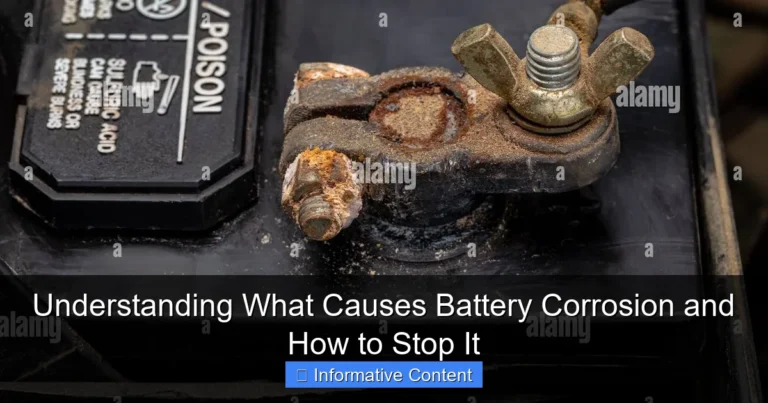
The first sign you’ll notice is the poor performance of the battery. Your car may start slowly, or your device might turn off unexpectedly. Other signs point to sulfation. Batteries often fail to hold a charge for as long. A visual inspection can reveal physical problems. These can range from a swollen battery case to a noticeable accumulation of white crystals on the terminals or around the battery. Always check for corrosion, which can also impede electrical flow. A combination of these signs indicates that your battery needs attention.
- Difficulty Starting: Your vehicle may crank slowly or not start at all.
- Reduced Performance: Devices powered by the battery will function for a shorter period.
- Visual Inspection: Look for a swollen case, white crystal buildup, or corrosion.
- Charging Issues: The battery might not reach a full charge even after being connected to a charger for a long time.
Using a Multimeter to Diagnose
A multimeter is a handy tool to confirm a suspicion of sulfation. It allows you to measure voltage and assess whether it meets standard levels. Set the multimeter to DC voltage, usually 20V for a 12V battery. With the battery disconnected from any load, check the voltage. A fully charged 12V lead-acid battery should read around 12.6 volts or higher. A significantly lower reading, say below 12.4 volts, indicates a potential problem. You can then check the battery’s internal resistance. The higher the resistance, the greater the degree of sulfation. Checking the voltage and internal resistance with a multimeter gives you an idea of the condition of the battery.
- Voltage Check: Measure the battery’s voltage with a multimeter.
- Low Voltage Indicator: A voltage below 12.4V (for a 12V battery) suggests a problem.
- Internal Resistance Measurement: Measure the internal resistance to see if it’s abnormally high.
- Load Test: A load test simulates real-world use to see how the battery performs under load.
Can You Fix a Charger Says Sulfated Battery?
Fixing a battery flagged as sulfated is possible, but its success depends on the severity of the sulfation. If the issue is caught early, you may be able to reverse the process with specific techniques. The most common methods involve using a battery charger with a desulfation mode, which applies a controlled charge and discharge cycle. Also, some specialized equipment is designed to send high-frequency pulses through the battery. There is no guarantee of success, but taking action can improve a battery’s performance. Always start with a cautious approach, considering the battery’s age and overall condition.
Desulfation Chargers and How They Work
Desulfation chargers use specific processes to reverse the sulfation process. These chargers apply a high-voltage, low-current charge to the battery. This helps to break down the lead sulfate crystals. They may also include a “pulse” mode. This pulse can shake loose the crystal formation on the plates. The idea is to restore the battery’s ability to accept and store energy efficiently. Keep in mind that not all sulfated batteries can be brought back to life, particularly if the sulfation is very severe or has been in place for a long time. These chargers are a useful tool and offer a chance to extend battery life.
- High-Voltage Pulses: These pulses help to break down sulfate crystals.
- Controlled Charging: The chargers carefully control the voltage and current to avoid damaging the battery.
- Desulfation Mode: This mode is designed to reverse the sulfation process over time.
- Monitoring: Some chargers monitor the battery’s progress during desulfation and adjust the process.
Using Chemical Additives
There are battery additives designed to dissolve or break down lead sulfate crystals. These additives are usually added directly to the battery’s electrolyte. They work by interfering with the chemical reactions that cause sulfation. The intention is to promote the reconversion of lead sulfate into lead dioxide and sulfuric acid. These additives come in liquid or powder form. It is important to remember that these additives might only have limited effectiveness, especially in older batteries. Before you use these additives, carefully follow the manufacturer’s instructions. Keep in mind that this is just one method of trying to reverse sulfation, and it doesn’t guarantee a complete recovery.
- Electrolyte Additives: These help dissolve lead sulfate crystals.
- Improved Performance: Additives can potentially increase the battery’s ability to hold a charge.
- Careful Application: Always follow manufacturer’s instructions to prevent damage.
- Not a Guarantee: Effectiveness varies based on the severity of sulfation and battery condition.
Preventing Battery Sulfation
The best strategy for dealing with a “charger says sulfated battery” is to take steps to prevent it in the first place. You can do this by taking good care of the battery. Regular charging, proper storage, and avoiding complete discharges can significantly extend battery life. By understanding the factors that lead to sulfation, you can take practical steps to protect your batteries. You can prevent sulfation by forming good habits of battery care. Proper care will help you keep your batteries running efficiently. This will also reduce the need to deal with sulfation in the future.
Regular Charging Habits
The single most important step you can take to prevent sulfation is to charge the battery regularly. This applies whether the battery is in use or in storage. Always charge your battery as soon as you notice that it’s low. It is wise to use a smart charger. Smart chargers monitor the battery’s charge level and regulate the charging process to avoid overcharging. Overcharging can be just as damaging as sulfation. If you have a car that is not used often, be sure to charge the battery at least once a month. This helps to keep it in good condition. By following these easy practices, you will ensure a long and useful battery life.
- Charge Regularly: Charge the battery after use and during storage.
- Smart Chargers: Use a smart charger for optimal charging.
- Periodic Checks: Check the voltage and charge levels periodically.
- Avoid Complete Discharge: Don’t let the battery go completely flat.
Proper Storage Techniques
If you’re going to store a battery, proper storage can prevent sulfation. The most important thing is to make sure the battery is fully charged before storage. The battery should then be stored in a cool, dry place. Extreme temperatures speed up the sulfation process. Storing the battery where the temperature remains moderate helps to slow down this process. It’s a good idea to periodically check the battery’s voltage during storage. Top it up when needed. If you follow these guidelines, you will preserve your battery’s life while it’s in storage. The goal is to keep the battery ready for when you need it.
- Fully Charge Before Storage: Ensure the battery is at full charge.
- Cool and Dry: Store in a cool, dry environment.
- Temperature Control: Avoid extreme temperatures, as these affect battery life.
- Periodic Checks: Monitor the battery’s voltage during storage.
Battery Sulfation: Case Studies and Examples
Understanding real-world scenarios can illustrate the effects of sulfation. Seeing how these issues affect vehicles and devices gives insight into what can go wrong. Consider the example of a car that sits unused for extended periods. Or the story of a device that loses its ability to hold a charge. In these examples, the impact of sulfation becomes evident. These instances highlight the importance of preventative measures and offer practical lessons. By looking at these real-life instances, you’ll see why battery maintenance is important.
Case Study 1: The Abandoned Car
A classic example is a car left in a garage for many months without use. The car’s battery slowly discharges over time. Lead sulfate crystals begin to form on the plates. The longer the car sits, the worse the sulfation becomes. When the owner attempts to start the car, the engine turns over slowly or not at all. A jump start may temporarily work, but the battery won’t hold a charge for long. A battery test would show low voltage and high internal resistance. This case illustrates how failure to charge and prolonged inactivity can quickly lead to sulfation. In this case, the owner should have taken steps to maintain the battery.
- Initial State: Car left unused for six months, battery fully charged.
- Progress: Battery slowly discharges.
- Symptoms: Slow or no start, reduced power.
- Remedy: Charger with desulfation mode.
- Outcome: Battery may recover or need replacement.
Case Study 2: The Seldom-Used Device
Consider a power tool that isn’t used frequently. The battery is left partially charged after the last use. Because the device is not used often, the battery remains in a partially discharged state. Over time, sulfation develops, reducing the battery’s capacity. When the tool is needed, the battery drains quickly, and the tool operates for a short time. The user may not realize that the battery is sulfated. The tool can’t perform at its best because of the battery. The battery eventually won’t charge properly at all. This case shows how underuse and incomplete charging cause problems. Using the device often and keeping the battery charged would help.
- Initial State: Tool battery left partially charged after last use.
- Progress: Battery in partially charged state, then sulfation starts.
- Symptoms: Short operating time, failure to charge.
- Remedy: Desulfation charger or battery replacement.
- Outcome: Battery performance restored or battery ruined.
| Scenario | Cause of Sulfation | Symptoms | Possible Remedies |
|---|---|---|---|
| Car Left Unused | Prolonged inactivity and discharge. | Slow starting, no start. | Desulfation charging, battery replacement. |
| Power Tool with Underuse | Partial charging, infrequent use. | Short battery life, tool problems. | Desulfation, more frequent use, improved charging. |
Frequently Asked Questions
Question: What causes a battery to sulfate?
Answer: Sulfation happens when lead sulfate crystals build up on a battery’s plates, usually when the battery is left partially discharged or sits unused for long periods.
Question: Can I fix a sulfated battery?
Answer: It’s possible to reverse sulfation, particularly if caught early, by using a desulfation charger or sometimes by adding chemical additives.
Question: How do I know if my battery is sulfated?
Answer: Common signs include difficulty starting your vehicle, a device that doesn’t hold a charge, and a charger that reports a sulfated battery message.
Question: How can I prevent sulfation?
Answer: Keep your battery fully charged, use a smart charger, and store the battery in a cool, dry place if you’re not using it.
Question: What tools do I need to diagnose a sulfated battery?
Answer: A multimeter is essential to measure the voltage and check the internal resistance of the battery.
Final Thoughts
Dealing with a “charger says sulfated battery” doesn’t have to be a headache. It usually means your battery has a buildup of lead sulfate crystals, preventing it from working properly. While it can be a nuisance, remember that it’s often fixable. You can try a desulfation charger, which can help break down those crystals. The best way to manage this is to take preventative steps: keep your battery charged, especially if you won’t use it for a while. Regular charging and smart storage will help you keep your battery in great shape. By being proactive and taking good care of your batteries, you can extend their lives and get better value for your money. So go ahead and give it a shot, you might just get your battery back to its best!